Why Choose an NFC Smart Door Lock for Your Business?
A business entrance is more than a doorway. It is where staff arrive, deliveries pause, and access decisions happen every day. An NFC Smart Door Lock can let authorized users unlock a door with a compatible phone or card, while giving managers clearer control over credentials. Lost cards can be disabled, and access permissions can be adjusted without changing the physical lock. That sounds simple. The setup is not always simple.
The 2024 Verizon Data Breach Investigations Report found that 68% of breaches involved a non-malicious human element. This figure is not specific to door locks, but it highlights why access procedures matter alongside technology. A business should check credential management, user permissions, audit records, and what happens during a network or power outage. A sleek reader cannot fix unclear staff policies.
Security technologist Bruce Schneier’s reminder is useful here: “Security is a process, not a product.” Applied to an NFC Smart Door Lock, that means reviewing access lists, updating credentials, and testing backup procedures—not just installing hardware. Consider the practical details: Will the reader work with existing doors? Can a manager revoke a former employee’s access promptly? Does the lock behave predictably when connectivity fails? These questions deserve answers before purchase. NFC can make entry faster and easier to manage, but it is not a complete security plan. That distinction is easy to overlook.
What Is an NFC Smart Door Lock?
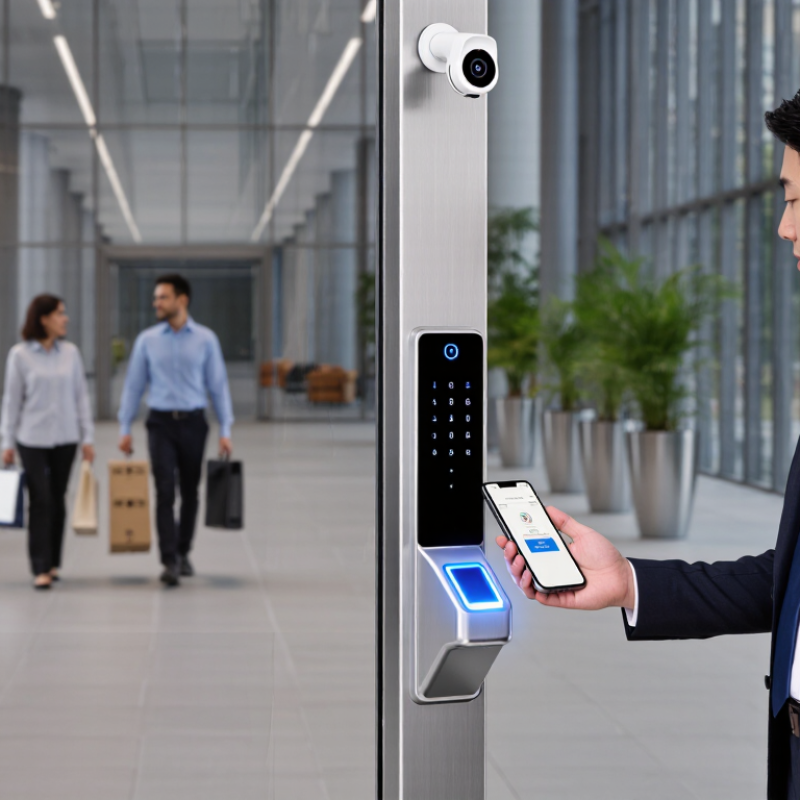
An NFC smart door lock uses near-field communication to identify an authorized card, key fob, or compatible phone held close to its reader. NFC works over a very short distance, so access usually requires a deliberate tap rather than a signal from across a room. Inside the lock, a reader passes the credential data to a controller. The controller checks whether that credential has permission to unlock the door, then activates the locking mechanism. A brief light or beep often confirms the result.
For a business, this can make daily entry easier to manage. A staff member can tap a card at a glass-fronted office entrance, while an administrator can assign or remove access without collecting physical keys. Depending on the system, access records may also show when credentials were used. That can help with routine oversight, though records are useful only if someone reviews them and keeps settings current.
NFC is not magic. A lost card still needs to be reported and disabled, and a lock with a depleted battery may interrupt entry. Businesses should check how credentials are managed, what happens during a network outage, and whether a secure backup method is available. The setup takes some thought. It is easy to overlook the backup plan when the reader works perfectly on a quiet day.
How Does NFC Access Control Work?
An NFC smart door lock communicates with a credential held close to its reader. That credential may be a card, a fob, or a compatible phone. The reader creates a short-range radio field and receives the credential’s data. Some passive cards draw enough power from that field to respond. The lock or connected controller then checks whether the credential is valid for that door and time. If access is approved, a small motor releases the latch. No key turning. The interaction usually takes only a moment.
For a business, the important step happens behind the reader. Access rules can limit entry by person, door, or schedule, while event logs help managers review activity. Depending on the system, checks may happen locally or through a network service. That distinction matters during an internet outage. Ask what still works offline, how lost credentials are disabled, and how access is restored if power fails. NFC does not make every setup secure by itself; reader placement, credential protection, and careful permission management matter too. One detail is easy to overlook: phone support and battery behavior vary. Test the actual doors and daily routines before relying on a new access method.
What Benefits Do NFC Smart Locks Offer Businesses?
An NFC smart door lock lets staff tap an enrolled phone or card at the reader instead of carrying a metal key. In a busy office, that can mean fewer copied keys and less time arranging replacements. Access can be set for a role, shift, or meeting, then removed when someone leaves. It feels simple at the door.
Control matters. Verizon’s 2024 Data Breach Investigations Report found that 68% of breaches involved a non-malicious human element. This does not prove NFC locks prevent breaches; it does show why clear permissions and prompt offboarding matter. Depending on the system, administrators can review access events and revoke a lost credential remotely. Keep a fallback plan for outages.
IBM’s 2024 Cost of a Data Breach Report put the global average breach cost at $4.88 million. A door lock cannot solve that exposure, but physical access controls can support a wider security program. Before choosing a system, check battery alerts, offline behavior, enrollment limits, and audit-log retention. NFC is convenient, not foolproof. Phones run flat. That detail is easy to miss.
Why Choose an NFC Smart Door Lock for Your Business?
NFC operates at 13.56 MHz, enabling compatible phones and cards to communicate with a lock at close range. This chart compares representative operating frequencies used by common access technologies.
Business takeaway: NFC supports convenient tap-based access and can reduce reliance on physical keys when paired with a suitable lock and credential-management system. Frequency alone does not indicate security; implementation and access controls matter. UHF RFID frequencies vary by region; 915 MHz represents the midpoint of the common U.S. 902–928 MHz band.
Which Business Environments Can Use NFC Smart Locks?
NFC smart locks can work well in offices, coworking spaces, and small retail locations. Staff can tap a card or phone at a shared entrance, while managers assign access by role or schedule. A coworking operator, for example, might give members access to meeting rooms but not the storage area. Fewer keys to track. These systems can also suit clinics, workshops, and back offices, where access needs vary between teams.
Busy sites benefit from clear access records and quick credential changes when staff leave. NFC locks may also help manage shared areas in hotels or serviced offices, but they are not a complete security plan. Door quality, network reliability, and backup entry methods matter. A failed phone battery can cause delays. I’ve seen teams focus on the reader and overlook who will update permissions. That gap is easy to miss.
Tips: Map doors and user groups before choosing a lock. Test access during a normal shift, including dead zones and power interruptions. Keep a practical backup method, and review permissions regularly. NFC is convenient, but it works best when daily procedures are just as carefully planned.
What Factors Should Businesses Consider Before Choosing One?
Before choosing an NFC smart door lock, map how people actually use the entrance. Count daily users, shift changes, delivery access, and doors that need different permissions. Confirm that the reader works with the cards or phones employees already carry. Check how quickly administrators can issue, suspend, and replace credentials. Staff turnover matters. A lost phone should not leave access active. Ask what happens during a network outage, power loss, or low battery, and test the fallback procedure on the actual door.
Security depends on more than the reader. Verizon’s 2024 Data Breach Investigations Report found that 68% of breaches involved a non-malicious human element, such as mistakes or social engineering. This is not a lock-specific statistic, but it highlights the value of clear staff procedures and limited permissions. Ask whether credentials and access logs are protected, who can view them, and how long records are kept. Be cautious of systems that promise security without explaining these controls.
Check installation conditions before comparing features: door material, reader exposure to rain, wiring, and compatibility with existing access systems. IBM’s 2024 Cost of a Data Breach Report put the global average breach cost at $4.88 million; that figure is not specific to door locks, but it underscores why connected devices deserve careful review. Request a demonstration of the administrator dashboard and a realistic outage test. A polished feature list can still miss a daily frustration: the right person being locked out at shift change.

